Description
Product Description
Body build and design
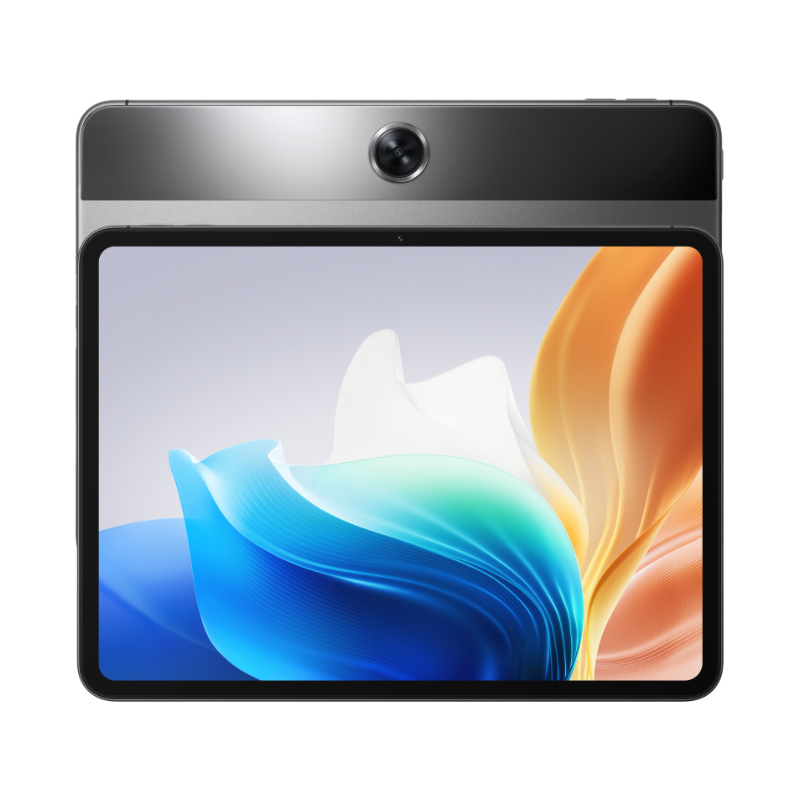
The budget-friendly tablet is built for productivity and fun. It has a metal body with a 6.9mm thickness and a 538g weight. Handling it when reading through reports, and articles and making presentations should not be a problem at all. It has a nano-SIM slot and a stylus support, which not only provides an opportunity for seamless connectivity whether hooked to the internet or local GSM network, but also productivity with the stylus coming in handy for creativity. The body is gray and has four speakers. Overall, the Oppo Pad Neo body build is designed to provide a premium, portable, and powerful experience.
Display
The pad has an 11.4-inch LTPS LCD with a resolution of 2408 x 1720 pixels, a 90Hz refresh rate, a 180Hz touch sampling rate, and a 7:5 aspect ratio. The immersive display also supports hardware-level low blue light, flicker-free, color temperature adjustment, and bedtime mode. Notably, it has a TUV Rheinland certification for eye comfort. The display is protected by Corning Gorilla Glass 5 and has a screen-to-body ratio of 86.4%. Oppo Pad Neo’s display is designed to provide a comfortable, enjoyable, and durable viewing experience. Whether gaming, browsing the internet, or navigating through your content in the gallery, you will have a great time considering the high resolution and eye-comfort display setup.
Camera Set on Oppo Pad Neo
The Oppo Pad Neo packs a rear camera and a front camera, both with 8MP resolution and f/2.0 aperture. The rear camera has a field of view (FOV) of 78°, while the front camera has an FOV of 78.2°12. The camera setup on the Oppo Pad Neo allows you to take photos and videos in various modes, such as panorama, time-lapse, sticker, text scanner, and portrait. You can also adjust the settings of the camera, such as the volume button function, fingerprint shooting, shutter sound, location, storage, one-touch photo, photo gestures, grid, and watermark.
To access the camera settings, you need to open the camera app and tap on the three dots icon in the upper right corner. You can also install a 3rd party camera app, such as Google Camera, to enhance the quality of your photos. However, you need to check the compatibility of the app with your device before installing it. The Oppo Pad Neo camera setup is designed to provide a versatile, convenient, and fun experience.
Processor Capabilities and Performance of Oppo Neo Pad
Processor
The Oppo Pad Neo provides decent performance, based on its specifications. It is powered by the processor with 8 cores, which ensures efficient performance for everyday tasks and light gaming.
Device Storage
The tablet also has up to 8GB of RAM and 128GB of storage, which can handle multitasking and app usage smoothly. Additionally, it comes with MicroSD which enables more storage, if you need it.
OS
Oppo Pad Neo performance is designed to provide a fast, smooth, and smart experience. Besides a decent chipset, it runs on Android 13 with ColorOS 13.2, which offers a user-friendly interface and various features such as App Relay, Content Sync, Screen Mirroring, and more.





Reviews
There are no reviews yet.